

Run AI tests and read prompt results
AI tests send a saved prompt to supported AI models and store each model response for analysis.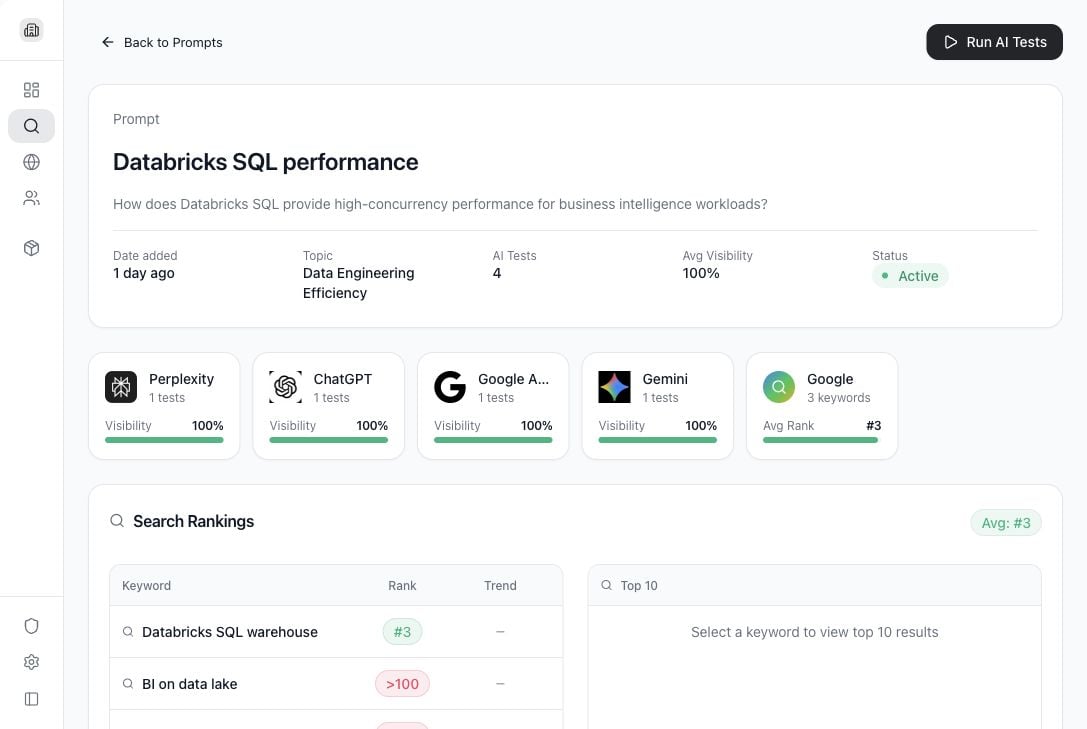
Use cases
- See which AI models mention the brand.
- Compare answers from ChatGPT, Gemini, Perplexity, Claude, and Google AI Mode where configured.
- Review sentiment, citations, competitor mentions, and search ranking context.
- Rerun a prompt after changing the prompt or company settings.
- Generate optimization actions from weak or missing visibility.
Open a prompt result
- Go to AI Search.
- Select a prompt row.
- Review the prompt detail page.
Run AI tests
- Open a prompt detail page.
- Select Run AI Tests.
- Wait for model responses to complete.
- Review the updated visibility and model result sections.
What each result means
- AI Tests: number of model responses stored for this prompt.
- Avg Visibility: how often the company appeared in the responses.
- Status: whether the prompt is active.
- Model cards: per-model visibility and response counts.
- Google search rankings: keyword ranking results associated with the prompt.
- Sentiment breakdown: how positive, neutral, or negative the stored answers are.
- Brand visibility: whether the company was mentioned relative to other brands.
- Sources: citations extracted from AI responses.
View a response
Open an individual AI response when you need to inspect the full answer, source citations, brand mentions, or sentiment details.Optimization plans
When available, optimization actions help translate weak visibility into content or source-improvement work. Use these actions as guidance for what to publish, update, or promote.What Tamlr saves from a test
- The prompt that was tested.
- The AI model that answered.
- The full answer text.
- Whether your company and tracked competitors were mentioned.
- Source citations found in the answer.
- Sentiment and visibility signals used in dashboards and reports.